The Network layer
Walk through the services provided by IP protocol
The IP Service Model
Datagram
IP works datagrams and forward the packages hop-by-hop
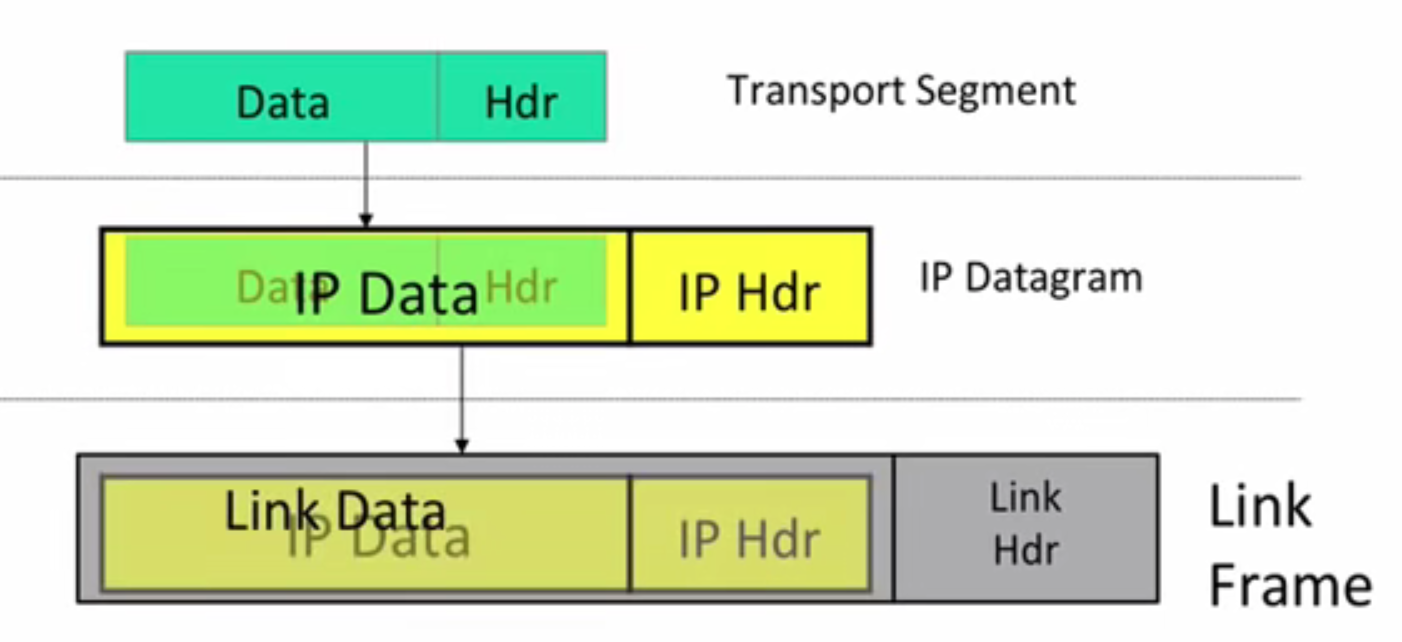
Router use destination part in datagram to lookup in a forwarding table for the next target it should send the datagram to
Unreliable
IP packages may be lost, duplicated, corrupted and so on, IP has NO guarantee
Best effort
IP only drop datagram if necessary, for example the congestion in a router force the router to drop the next incoming datagram
Connectionless
It doesn’t establish an end-to-end connection, it simply router the packages
Why the IP Service so simple?
- Simple and minimal gives faster, more streamlined and lower cost network
- The end-to-end principle: If possible implement features in the end hosts(the source and destination computers) rather than the network
- Allow a variety of services, both reliable and unreliable to build on the top of IP.(Not all services need a reliable connection, for example, in real-time application, the resent package may be to old to use when it finally arrive the destionation)
- Work over any link layer : IP make very little assumption of the below layer, make it easy to build the hardware for transmission
More on IP Service Model
IP tries to prevent packages looping forever
This can happen when the forwarding table went wrong in some router
It doesn’t prevent the loop from happening but catch and delete the looping packages
It is implemented with the following idea
There is a hop count (TTL,Time-to-live)field in IP header

1
2
3
4
5
6
7
8
9
10
11
//every package's TTL is initalized to max_allow
void route(Package p){
if(p.TTL == 0){
drop(p);
}
else{
p.TTL--;
forward_to_next(p);
}
}
IP will fragment packages if they are so long
Different link layer can carry different max amount of data, for example, ethernet can only carry packages shorter than 500 bytes
The IP header provide router with information it need to fragment big packages into smaller ones.
These small packages also contain information for laterly reassemble
IP use
header checksumto reduce chance of delivering the packages to the wrong destinationVersions of IP
- IPv4 : 32 bit address
- IPv6 : 128 bit address
allow new options to be added to header.
This feature violent the simple design and the end-to-end principle, so it is hardly used. Moreover, adding new field to header requires adding hardware to routers
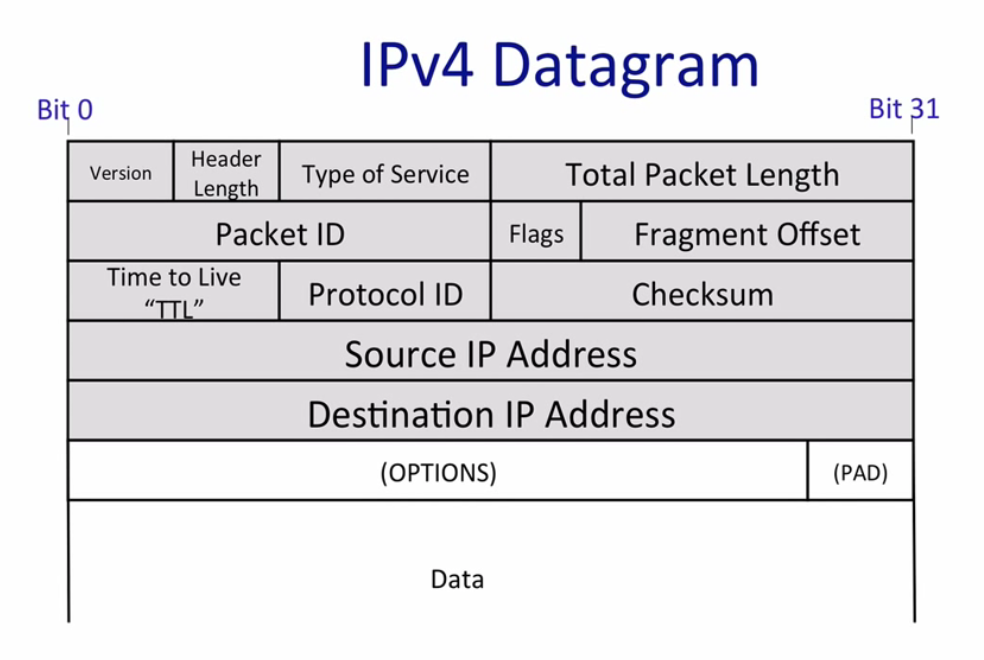
IP header explanation
Source address : package from
Destination address : package to
Protocol : what protocol is used for the data field(list)
1
2
3
4
5
6
7
8
9
10
11
IPnumbers = {
1 : "ICMP",
...,
6 : "TCP",
...,
17: "UDP",
...
}
Package p
protocol_to_use = IPnumbers[p.protocal]
process_data(p.data , protocol_to_use)Version : specify IPv4 or IPv6
Identification(aka Package ID), Flags, Frgment offset are used for package fragmentation
TOS(Type of Service) gives how important the package is
IHL(IP header length)
Tips
Network layer only send package between computers, it doesn’t care about which application need the package, this is the job of Transport layer.
TCP port is like an address for applications
There are chances that the router is the destination of a package, for example, when you log in a router using TCP, that is the case.
* * *intraceroutemeans the router doesn’t response totraceroute, indicating that the router doesn’t want others to know it.